Thursday, 25 February 2016

Single Name On Facebook Account

Steps To Make Single Name On Facebook Account

To make this article more simple. I divide this article into two parts so it will become easy to understand. In first part we will change our proxy settings for browser and in second part we make our Facebook account name single. So follow both parts step by step carefully

 Part 1:- Proxy Settings For Browser

  • In case Your are not able to add proxy settings and facing any problem then i recommend todownload Hola Better Internet VPN.
  • Install Hola Extension in Firefox or Chrome and then turn ON Hola and search and select Country Indonesia. 
  • It will automatically Implement proxy settings on your browser so you don’t need to add proxies manually. 
 OR
  • First of all to use single name on Facebook. We need to Add manual proxy settings in our browser. So we need to use Indonesian proxy Search it at Google or i recommend to find it fromProxynova.com or any other site of your choice. 
  •  If you have knowledge about Using proxy settings in browser then its good. If you are don’t know how to add proxy then read How To Add Proxy Settings in Browser.


Part 2:- Settings To Make Single Facebook Account

  • After doing proxy settings manually or by using Hola extension make sure it is working fine on Facebook.
  • Now its time to create single name id to do this.
  • Open your Facebook Account  Settings.
  • Change your language to Bahasa Indonesia.

  • Then  edit your current Facebook profile name and Simply remove Your Last Name. After that review your name and Save it.
  • After that your Facebook Account is only using First Name and you will see that Last Name Hide.
  • After Completing all steps, Remove Manual Proxy or Turn off Hola and change your language back to English (US) or other according to you.
NOTE:- MAKE SURE THAT YOU DON’T HAD ALREADY CHANGED YOUR ACCOUNT NAME FROM LAST 60 DAYS AND OTHERWISE YOU WILL NOT BE ABLE TO MAKE SINGLE NAME UNTIL YOU CROSSED 60 DAYS TIME PERIOD. IF YOU CROSSED NAME CHANGE LIMIT THEN IT IS NOT POSSIBLE TRY IT ON ANOTHER ACCOUNT.
I think there is no Need of Proof because our Tricks is working from Aug 2012 and our 1M+ users successfully make single name through our blog :) but if you want then check proof here

Method To Accept All Friend Requests On Facebook

Method To Accept All Friend Requests On Facebook

  • First of all click below given link and open it into the browser in which you have open your Facebook account or visit here
HTTPS://WWW.FACEBOOK.COM/REQS.PHP
  • After opening above given link in browser. All Pending request will visible there.
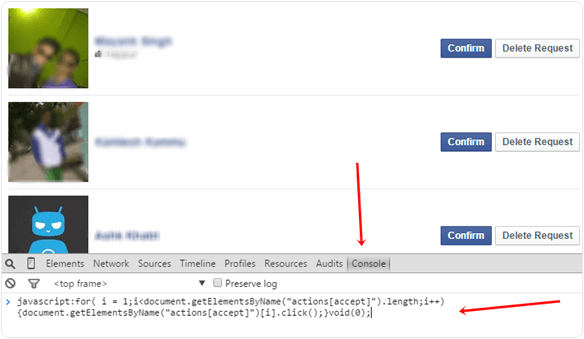
  • Now Click F12 to open console box or even you can open it by doing right through Inspect Element.
  • Copy below given code and paste it in console box. It will look like as shown below.
Accept or confirm all facebook friend request script
javascript:for( i = 1;i<document.getElementsByName(“actions[accept]”).length;i++){document.getElementsByName(“actions[accept]”)[i].click();}void(0);

  • After pasting above given code. Press Enter and wait for sometime until all pending request will not get confirmed.
  • Now Scroll down and make sure all request are accepted. In case their is a See more option then click on it.
Accept all facebook friend request see more button
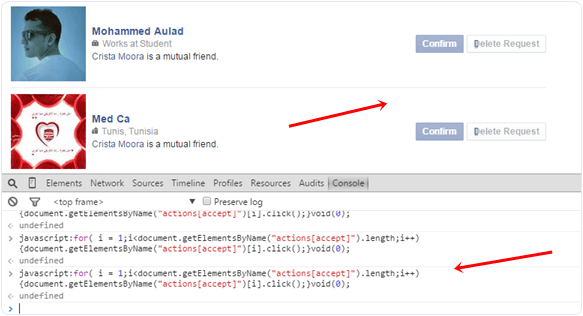
  • Again run the same script in console to accept request of pending request.
  • Follow the same process until all the request will not get accepted.
Accept or confirm all facebook friend request script run
I hope you like this trick to accept all friend requests on Facebook at once. If you face any issue or want to suggest regarding this topic must leave your precious comment.

Add All Friends To Facebook Group

Today i will discuss about method to add all member in Facebook group. Sometimes we had an account with 5000 or less friends. So its not an easy task to add too many friends and you face difficulty while adding them one by one. Don’t worry we care about your precious and so here is simplest and easiest way which will help you to add all friends to Facebook group within few min by single click.

Steps To Add All Friends To Facebook Group


  • First of all Log in into that whose friends you want to invite.
  • Then open your Facebook Group in which you want to add friends.
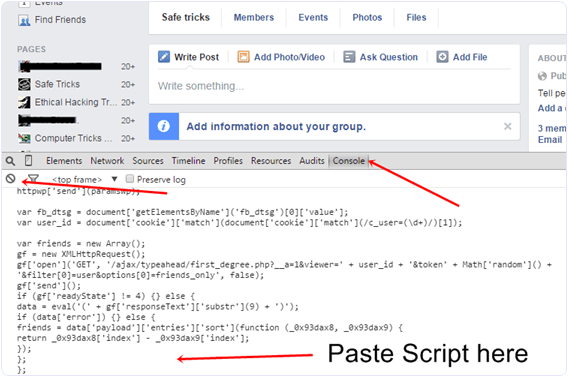
  • Now Click F12 button to open debugger and then select console box.
  • Now copy script from below given button.
  • Copy paste the whole provided code and then paste them into console box.
add-all-friends-to-facebook-group-script-code
  • Press enter and process will start for sending invitation.
Note:- Don’t worry about anything this script is totally safe. In case you have too many friends then you get blocked for using groups or even your account may get locked. So be careful.
If Face any type of problem and want any type of suggestion just feel free to share your comment.

Contact Us

Name

Email *

Message *